Organizer Account Setup
Setting up your organizer account is quick and secure — get started in minutes to unlock event creation tools. If you already have a regular attendee account, you can upgrade it to organizer status without losing your data.
Need help? Our Support team is available.
Access the Organizer Sign-Up Page
On any page of the ECTickets site, scroll to the bottom and look for the “Account” section, then click the “Create Organizer Account” link. This takes you directly to the dedicated sign-up form.
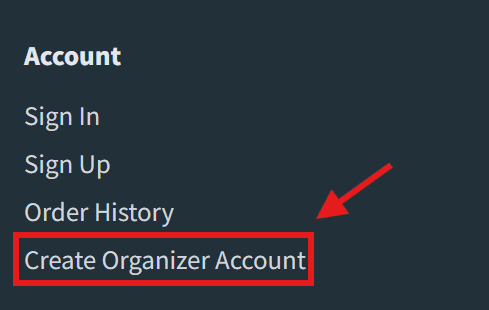
Screenshot: Highlighted “Sign Up” link in the footer
Step-by-Step Sign-Up Process
Follow these steps to create or upgrade your account. The process verifies email ownership.
1. Fill Out the Sign-Up Form
- Navigate to the organizer sign-up page from the footer link.
- Enter your email address and create a strong password (at least 8 characters).
- Toggle “Create Organizer Account” to Yes (pre-checked).
- If you have an existing attendee account:
- Use the same email to sign up.
- Enter your original password to verify and link accounts.
- Click “Sign Up” to submit.
Use a business email for organizer accounts. Passwords are hashed and never stored in plain text.
2. Verify Your Email
- Immediately after submission, we’ll send a verification email to the provided email address.
- Check your inbox (and spam folder) for the “電子郵件驗證 - ECTickets” email.
- Click the 立即驗證 inside the email to confirm ownership.
- If the email doesn’t arrive within 30 minutes, return to the sign-in page and sign in with your credentials to resend the verification email.
3. Account Activation
- Upon clicking the link, your account activates instantly.
- A new Organizer Team is created for you, with full admin access.
What Happens Next?
- Dashboard Access: Log in to Dashboard to buy an event token and start creating.
- Team Members: To invite colleagues or accept a team invitation, see Invite Team Members.
- Troubleshooting:
- No email? Resend from the sign-in page by logging in again 30 minutes later or check spam.
- Existing account issues? Use “Forgot Password” to reset.
If you have a non-organizer account, the upgrade preserves your attendee history (e.g., past tickets). Just enter your original password during setup — no new email needed.
Once set up, proceed to Event Creation to launch your first event.